

Get Recurring Gym Payments Live in 30 Days for Owners

Recurring gym payments are automated, scheduled charges that keep member accounts current without anyone chasing invoices. Get this right and revenue becomes predictable and staff stop spending hours on manual billing. The first move: pick a billing model (subscription, charge-upfront, or annual) and connect it to your gym management system so charges run on tokenized cards or bank accounts automatically.
TL;DR:
- Most gyms should prioritize monthly billing for predictable revenue, with biweekly payments matching cash flow for members paid on that schedule.
- Using tokenized payment methods and webhook automation helps ensure accurate real-time membership updates and reduces manual reconciliation errors.
- Implementing a three-attempt retry schedule and automated reminders significantly decreases involuntary churn due to failed payments.
- Accepting ACH transfers alongside cards can lower transaction costs and improve long-term payment success rates without forcing members off preferred methods.
- Testing decline scenarios, webhook reliability, and clear cancellation policies before launch minimizes common billing issues and member disputes.
Table of Contents
- How Do You Set Up Recurring Gym Payments?
- Which Payment Methods Should Gyms Accept?
- How Do You Handle Failed Payments and Reduce Involuntary Churn?
- What Pricing and Billing Cadence Reduce Cancellations?
- How Do Billing Integrations and Reconciliation Actually Work?
- What Should a Gym Expect From Fitness Flow’s Billing Rollout?
- Recurring Gym Payment Checklist and Quick Fixes
- What I’ve Learned Watching Gyms Roll Out Billing Changes
- Get Your Billing and Retention Running on One System
- Sources
How Do You Set Up Recurring Gym Payments?
Setting up recurring billing for gyms isn’t a one-click job, but it’s not complicated either if you work through it in order. Get the sequence wrong and you’ll spend months untangling refund disputes and mismatched invoices.
Start with the billing model. A subscription model charges members on a recurring date tied to their join date, which Patreon’s billing documentation breaks down clearly even though it’s built for creators, not gyms. Charge-upfront models bill immediately and then on a fixed cycle, often requiring at least one full billing cycle before a member can cancel without owing the next payment. Annual and prorated models trade short-term cash flow for lower churn and simpler math.
- Choose your model. Match subscription billing to month-to-month gyms, charge-upfront to gyms selling package deals, and annual billing to gyms with high-commitment programs.
- Set the cadence. Monthly is standard, but biweekly can smooth cash flow for members paid on that schedule.
- Pick a processor. Look for tokenized recurring charges and webhook support, which Stripe Billing offers along with automated retry logic.
- Integrate with your gym software so a successful or failed charge updates membership status in real time.
- Run test scenarios, including signup, upgrade, decline, and refund, before going live.
- Publish your policies on cancellation windows, refund rules, and how members will be notified of billing changes.
Pro Tip: Test a declined card scenario before launch. If your system doesn’t automatically flag it and hold access, you’ll find out the hard way when a member walks in on a suspended account.
Which Payment Methods Should Gyms Accept?
The method mix matters more than most owners assume. Cards are the default, but they aren’t always the cheapest or most reliable option for recurring gym billing.
- Credit and debit cards work almost everywhere and members expect them, but they carry higher processing fees and chargeback exposure when a member disputes a charge after canceling.
- ACH and pay-by-bank transfers cost less per transaction and tend to produce better long-term success rates for recurring charges, according to Aeropay’s analysis of gym payments, though the bank-linking step adds friction at signup.
- Digital wallets speed up checkout and use tokenization by default, which cuts down on abandoned signups at the front desk or online.
For most gyms, cards remain the entry point because members already trust them. Layering in ACH for members willing to link a bank account, per NACHA’s explanation of how ACH transfers settle, can meaningfully lower your processing costs over a full membership base without forcing anyone off cards who prefers them.
How Do You Handle Failed Payments and Reduce Involuntary Churn?
Failed payments are the quiet revenue killer in gym billing. A card expires, a bank flags a charge as suspicious, or a member simply runs low on funds that week, and if your system doesn’t respond, that membership silently lapses.
- Build a retry schedule. Three attempts spaced two to four days apart catches most temporary failures without hammering a declined card.
- Set grace-period rules. Give members a short window, often three to five days, before suspending gym access.
- Automate dunning communications. Email and text reminders that prompt a card update convert far more often than a single notice.
- Track retry success rate and involuntary churn monthly, and set a target for improvement each quarter.
Pro Tip: Don’t suspend access the moment a payment fails. A same-day cutoff turns a billing hiccup into a canceled membership and a bad review.
What Pricing and Billing Cadence Reduce Cancellations?
Cadence shapes behavior more than most owners expect. Monthly billing is predictable for you but can feel heavy for members paid biweekly, while annual plans lower churn simply because members aren’t reminded of the cost every 30 days.
- Monthly billing gives you steady, forecastable revenue and is the easiest for members to understand.
- Biweekly billing can reduce failed payments for members who get paid every two weeks, since the charge lines up with their cash flow.
- Annual billing tends to produce the lowest churn but requires a lower effective price to justify the upfront commitment.
- Prorated or charge-upfront billing keeps access fair when someone joins mid-cycle and simplifies the cancellation conversation later.
Run small experiments rather than overhauling everything at once. Test a longer trial length against your current default, or shift one membership tier from monthly to biweekly, and watch the churn numbers for 60 to 90 days before rolling changes out gym-wide.
How Do Billing Integrations and Reconciliation Actually Work?
The technical wiring behind recurring gym payments matters just as much as the policy decisions. Get the integration wrong and you’ll have accurate-looking numbers that don’t match what’s actually in your bank account.
- Use tokenization for every stored card or bank account, which keeps raw payment details off your servers and shrinks your PCI compliance scope.
- Implement webhooks for payment-succeeded and payment-failed events so membership status updates automatically instead of through manual checks, a pattern Stripe’s subscriptions integration guide documents in detail.
- Reconcile weekly, matching processor payouts against your invoice and membership records so discrepancies get caught fast.
- Test edge cases before launch: time-zone billing drift, duplicate charges, and what happens when a member upgrades mid-cycle.
Pro Tip: Duplicate charges usually trace back to a webhook retry firing twice. Build idempotency checks into your integration so the same event can’t create two invoices.
What Should a Gym Expect From Fitness Flow’s Billing Rollout?
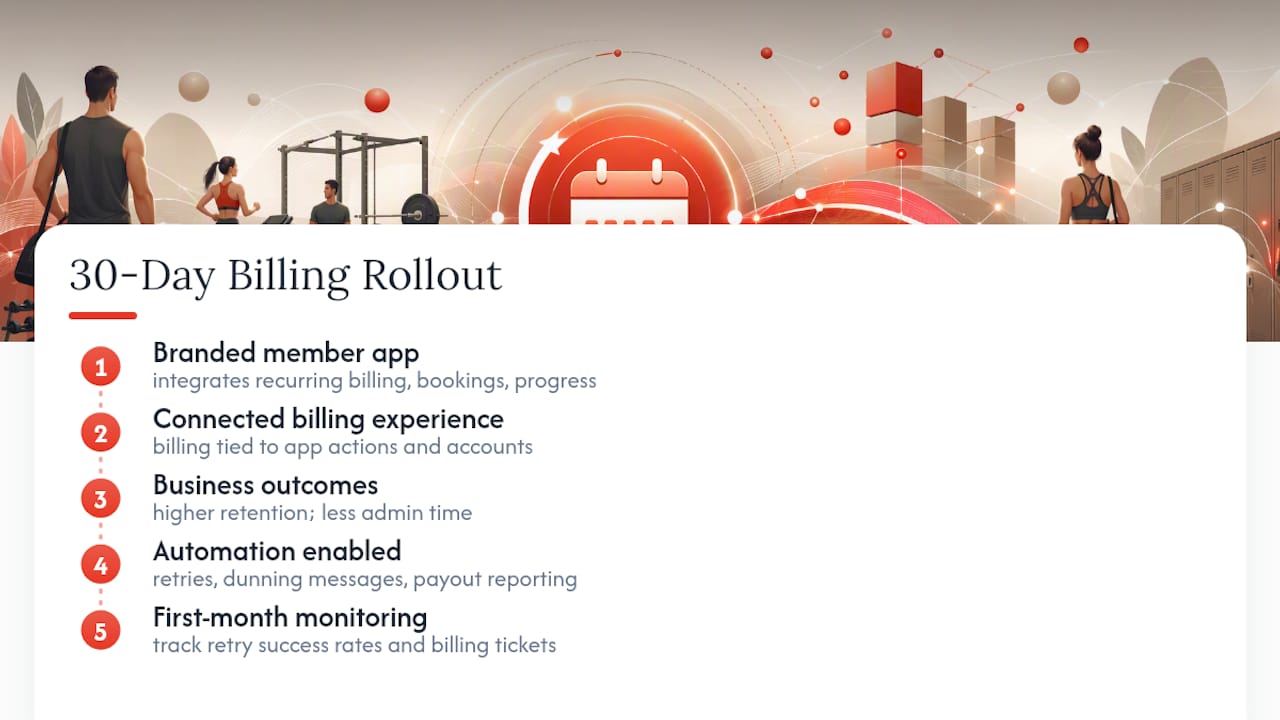
The platform integrates recurring billing directly with a branded member app that members use to book classes and track progress, creating a connected billing experience. Users of this platform report increased member retention and time saved on administrative tasks. Retries, dunning messages, and payout reporting can be automated. It is recommended to monitor retry success rates and support tickets related to billing in the first 30 days after rollout.
Recurring Gym Payment Checklist and Quick Fixes
Before launch: finalize pricing rules, run test transactions, publish cancellation terms, and confirm PCI compliance access with your processor.
- Days 0 to 30: Monitor retry outcomes, reconcile payouts weekly, and collect direct member feedback on the billing experience.
- Declined card? Prompt an immediate token update through the member app.
- Duplicate charge? Check for a webhook firing twice before refunding.
- Webhook timeout? Rebuild the event listener and reprocess missed events manually.
IssueLikely CauseFix
Declined card
Expired or insufficient funds
Automated update prompt
Duplicate charge
Webhook fired twice
Idempotency check
Access not suspended
Webhook missed
Manual status sync
Refund dispute
Unclear cancellation policy
Publish written terms
What I’ve Learned Watching Gyms Roll Out Billing Changes
The billing system rarely fails. Staff training does. Front-desk teams need to know exactly what a declined card looks like in the system before members start asking questions they can’t answer. Measure retention for 90 days after any billing change, not 30, because the real churn signal shows up later. Roll changes out to one membership tier first, not everyone at once.
— Louis
Get Your Billing and Retention Running on One System
This system replaces multiple tools with one platform that handles billing rules, retry logic, member communications, and payout reconciliation, all integrated with a member app used for booking classes.

If you’re setting up or rebuilding your recurring billing this year, a demo of Fitness Flow will show you exactly how the retry schedules, dunning messages, and branded member app fit into your specific gym before you commit to anything.