

Failed Payment Recovery: A Playbook for Billing Teams

Run smart, issuer-informed retries first, then trigger targeted customer outreach only for failures that actually need customer action. Automate one-click payment links and follow a 30-day recovery timeline so nothing stalls past the window when most recoveries happen. That’s the entire model.
In the next 24 hours, you can enable a card updater, add tokenized one-click update links to your billing emails, and set webhooks that fire the moment a charge fails. Watch three numbers starting today: daily failed-charge count, your initial recovery rate, and time-to-recovery.
- Turn on card updater services through your processor
- Add one-click, tokenized update links to failure emails
- Set webhooks on failed-charge events for instant classification
Pro Tip: Fitness Flow customers running membership billing through the platform can push these update prompts straight into the branded member app, which cuts the lag between a failed charge and a fixed one.
Key Takeaways
Failed payment recovery works best when issuer-informed smart retries handle soft declines automatically and multi-channel outreach with one-click links handles everything that needs customer action.
PointDetails
Classify before you act
Route soft declines to retries and hard declines straight to an update prompt; never retry a fraud flag.
Front-load your recovery window
Most successful recoveries happen within the first 10 days, so your fastest outreach should hit early, not late.
Use issuer signals, not blind schedules
Visa and Mastercard authorization-state signals raise retry success and reduce the risk of processor account flags.
Track more than recovery rate
Cost per dollar recovered, churn reduction, and post-recovery lifetime value tell you if your process actually works.
Fitness Flow unifies the flow
Gyms running Fitness Flow route recovery prompts through the branded member app instead of a separate dunning tool, alongside billing and scheduling in one system.
Table of Contents
- What Counts as a Failed Payment in Payment Recovery?
- Why Does Failed Payment Recovery Matter for Revenue?
- What Causes Payments to Fail?
- How Does an Automated Recovery Flow Work Over 30 Days?
- Which Tools and Integrations Actually Improve Recovery Rates?
- Are Blind Retries Risky, and What Should Replace Them?
- What Does a 30-Day Recovery Timeline Look Like?
- How Should You Segment Customers for Recovery Campaigns?
- What Metrics Matter Beyond the Basic Recovery Rate?
- How Does Recovery Fit Into Your Broader Billing Stack?
- How Do You Handle International Payment Recovery?
- Can You Prevent Payment Failures Before They Happen?
- Get Automated Failed Payment Recovery Built Into Your Gym’s Billing
- Frequently Asked Questions
- Sources
What Counts as a Failed Payment in Payment Recovery?
A failed payment is any attempted charge a card network or bank rejects before it settles. Payment recovery is the operational process of getting that money in through retries, customer outreach, or both. The distinction that matters most is soft decline versus hard decline.
- Soft declines are temporary: insufficient funds, a network timeout, a busy issuer. Retry these on a schedule.
- Hard declines need customer action: expired card, wrong CVV, closed account. Retrying blindly wastes attempts and can flag your merchant account.
Route by decline code, not by guesswork. Card updater services, standardized decline codes, and webhook events are the three technical anchors that let you automate this routing instead of eyeballing each failure.
Why Does Failed Payment Recovery Matter for Revenue?
Involuntary churn, the kind caused by payment failures rather than a customer choosing to leave, commonly makes up 20% to 40% of total subscription churn, and most of it is fixable. That’s not a minor billing nuisance. That’s a chunk of your subscriber base walking out the door because a card expired, not because they wanted to quit.
Track five numbers: recovery rate, time-to-recovery, recovered MRR, cost per dollar recovered, and involuntary churn rate as a percentage of total churn.
- Recovery rate tells you how much of the failed pool comes back
- Time-to-recovery tells you how fast your system works
- Recovered MRR ties recovery directly to revenue reporting
Early recovery protects lifetime value and smooths cash flow. A subscriber recovered on day 3 never shows up as a cash gap; one recovered on day 25 already cost you three weeks of runway math.
What Causes Payments to Fail?
Most failures fall into six buckets, and each one has a correct first move.
- Expired cards need an immediate update prompt, not a retry.
- Insufficient funds are worth a scheduled retry timed to likely payday windows.
- Issuer fraud flags or holds, including authorization holds from hotels or rental companies, require the customer to contact their bank; retrying does nothing.
- Replacement cards not yet activated or expired numbers need an update link, sent fast.
- User data errors, like a mistyped billing zip code, are common enough that a simple retry after a correction usually clears them.
- Processor outages or velocity limits call for a short delayed retry, since the issue often resolves itself within hours.
Pro Tip: Decline codes tied to funds or network issues (do_not_honor, insufficient_funds, processing_error) are usually worth retrying. Codes tied to fraud, stolen card, or closed account are not; retrying those just burns attempts and risks your processor’s attention.
How Does an Automated Recovery Flow Work Over 30 Days?
The flow has four stages: detection, classification, retry, and escalation. Get these in the right order and most of your recovered revenue lands inside the first ten days.
- Detect. A webhook fires the instant a charge fails. Pull the decline code and the customer’s payment history immediately.
- Classify. Soft decline versus hard decline determines the entire next step. Don’t skip this; it’s the fork in the road.
- Retry (soft declines only). Wait before the first attempt. Immediate retries rarely succeed and can draw scrutiny from your processor, so a short delay before that first retry, timed loosely to when the customer is likely to have funds available again, performs better than firing right away. Vary the time of day across attempts and cap total retries around 3 to 4 over 10 to 14 days.
- Escalate outreach in sequence. Start with a friendly email carrying a tokenized one-click update link. If there’s no response, move to SMS with the same secure link. Still nothing? Trigger an in-app banner or modal. For higher-value accounts, escalate to a voice call or human follow-up.
- Route by classification. Soft declines go through the retry ladder first. Hard declines skip retries entirely and go straight to an update prompt with a short, tight dunning sequence. Fraud flags pause all automated attempts and direct the customer to call their issuer.
- Track and stop. Log every attempt in a retry ledger. Run A/B tests on messaging and timing. Build a hard rule that stops outreach after a set number of unanswered attempts or an explicit opt-out.
Stripe’s own guidance backs this sequencing: pairing scheduled retries with secure, low-friction payment links reduces the friction that kills recovery attempts. And the sequencing isn’t arbitrary. Recurly’s data shows most successful recoveries land within the first 10 days, so a flow that drags outreach out past two weeks is already losing.
Pro Tip: If you’re switching from an old dunning tool to a new one, turn off the legacy system completely before flipping on the new sequence. Running both at once means customers get duplicate emails, conflicting instructions, and sometimes two retries hitting the same card on the same day, which looks like fraud to the issuer.
Which Tools and Integrations Actually Improve Recovery Rates?
Six capabilities do most of the heavy lifting: network-level retry intelligence, card updater or token refresh services, hosted payment update pages, tokenized one-click links, multi-channel messaging across email, SMS, and in-app, and webhook-based retry orchestration.
- Network-level retry logic beats static, single-merchant rules because it draws on patterns across many merchants and issuers, not just your own transaction history.
- Card updaters silently refresh tokens when a bank reissues a card, closing the gap before the customer even notices.
- Hosted update pages remove the need to build your own secure payment form.
- One-click links skip login friction entirely, which is often the single biggest drop-off point.
Add this as a layer over your existing billing system through APIs and webhooks rather than ripping out core billing. It’s far less engineering work and it ships faster. Optimized retry strategies have pushed recovery rates from roughly 53% up to about 71% in enterprise analyses, almost entirely from better timing and issuer awareness, not from bigger discounts or more aggressive messaging.
Watch one-click update conversion rate and retry success broken out by time-of-day window; both numbers usually expose quick wins within the first month.
Are Blind Retries Risky, and What Should Replace Them?
Yes. Firing retries on a fixed schedule without any signal from the card network is how merchants rack up unnecessary declines, and in some cases scheme fines or account flags from repeated failed attempts.
Visa and Mastercard both expose authorization-state signals that indicate whether a retry is likely to succeed right now. Using that signal instead of a blind schedule raises success rates and keeps your merchant account clean.
- Blind retries risk scheme fines and processor account flags
- Repeated failed attempts can look like fraud probing to an issuer
- Ignoring issuer signals wastes retry attempts that were never going to succeed
Pro Tip: If you’re planning to change retry volume or timing in any meaningful way, loop in your acquirer or processor first. They can tell you whether your current pattern already sits near a fine threshold, information you cannot see from your own dashboard.
What Does a 30-Day Recovery Timeline Look Like?
Here’s a timeline you can drop into most automation tools without much modification.
- Day 0: Webhook detects the failure and classifies it by decline code.
- Day 2 to 3: First smart retry for soft declines, timed to avoid an immediate repeat.
- Day 4: Second retry plus a friendly heads-up email with a one-click update link.
- Day 8: Escalate to SMS with the same secure link and add an in-app modal.
- Day 14: Final urgency notice, escalating to a voice call or human follow-up for higher-value accounts.
- Day 21: Close the case; downgrade or pause the subscription per your policy.
Sample copy that actually gets clicked:
- Heads-up email: “Your last payment didn’t go through. Update your card in one click, takes 15 seconds.”
- Urgency email: “Your account is at risk of losing access. Fix your payment now before your next billing date.”
- SMS: “Payment failed. Update here: [secure link]. No login needed.”
- In-app modal: “We couldn’t charge your card. Tap to update and keep your access active.”
Before launch, confirm four things: webhooks are firing correctly, your hosted update page is tested with a real tokenized link, you’ve run test transactions through the full sequence, and opt-out handling plus analytics tags are wired in so you can measure what’s working.
How Should You Segment Customers for Recovery Campaigns?
Not every failed payment deserves the same message. A high-value annual subscriber who’s been paying for three years without a hiccup deserves a different tone than a first-month trial user whose card just failed on attempt one.
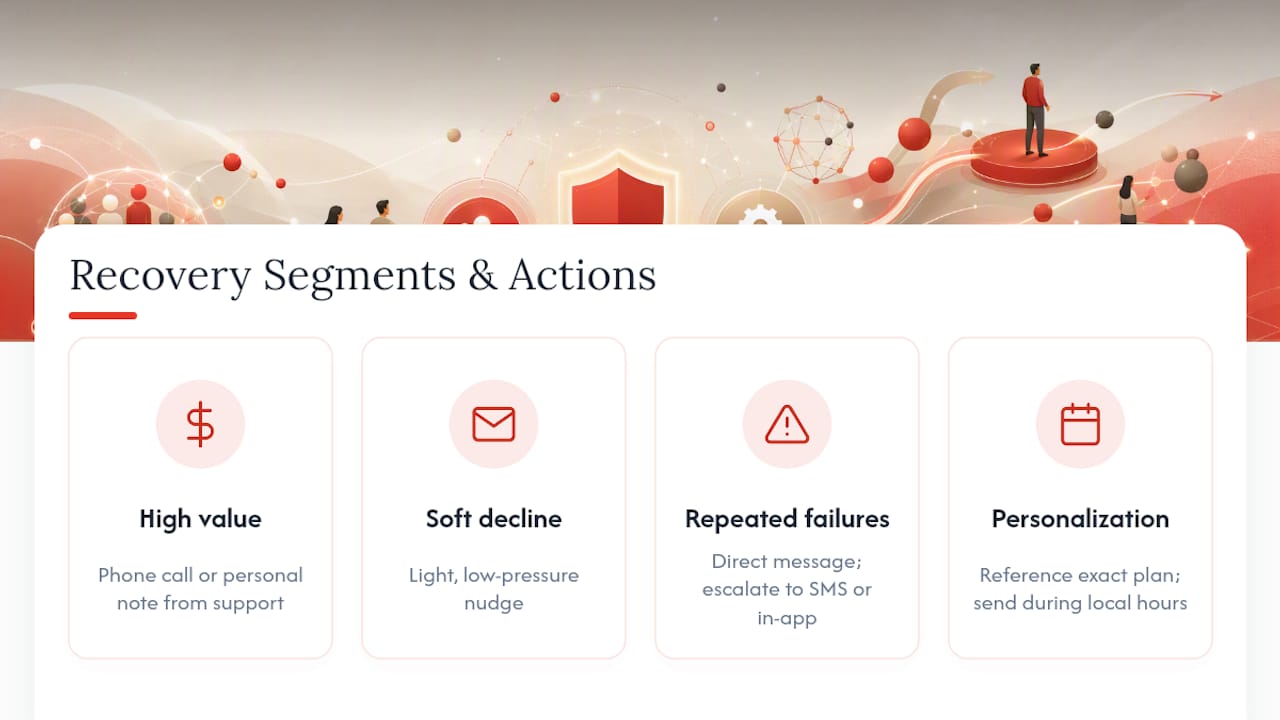
Segment by account value, tenure, and failure history. A customer with a first-time soft decline gets a light, low-pressure nudge. A customer on their third failure in six months needs a more direct message and probably a faster escalation to SMS or in-app. High-value accounts justify a phone call or a personal note from support; low-value accounts don’t need that engineering.
Personalize the message itself, not just the channel. Reference the specific plan or product they’re paying for, not a generic “your subscription” line. For gym and studio operators using Fitness Flow, that might mean referencing the exact membership tier or class package tied to the failed charge, since a member who feels seen as an individual, not a line item, responds better to update prompts.
Time zone and local payment habits matter too. Sending an SMS at 3 a.m. local time because your system defaults to your own headquarters’ clock kills open rates. Segment by geography enough to schedule outreach during reasonable local hours, and route to the channel that segment actually uses. Some demographics respond better to email; others barely open anything but SMS.
What Metrics Matter Beyond the Basic Recovery Rate?
Recovery rate tells you what came back. It doesn’t tell you what it cost, how it affected retention, or whether the customer stuck around afterward.
Track cost per dollar recovered, since aggressive multi-channel outreach with voice calls and human follow-up costs more per recovery than an email-only sequence, and that cost needs to justify itself against the revenue saved.
Track churn reduction specifically attributable to recovery efforts, separate from voluntary churn. If involuntary churn drops as a share of total churn after you tighten your recovery flow, that’s the number finance actually wants to see.
Track post-recovery retention: does a customer recovered through a rough dunning sequence stick around for another six months, or do they quietly cancel at the next renewal anyway? That gap tells you whether your recovery process is fixing the payment or just delaying the goodbye.
Track customer lifetime value split by recovery cohort versus never-failed customers. If recovered customers show meaningfully lower LTV, that’s a signal your messaging or experience during recovery needs work, not just your retry timing.
How Does Recovery Fit Into Your Broader Billing Stack?
Failed payment recovery shouldn’t live in an isolated tool bolted onto the side of your business. It needs to talk to your subscription management system, your CRM, and your revenue reporting, or you end up with numbers that don’t reconcile.
Recovered MRR needs to flow into the same dashboard as new MRR and expansion revenue, or finance is stuck manually stitching together numbers from two systems every month. Customer status changes, paused, downgraded, or reactivated after recovery, need to sync back into your CRM so support and sales see accurate account health instead of working from stale data.
For gym and studio operators, this means your recovery layer should connect directly to the same system that handles member scheduling, class bookings, and engagement tracking. A member who’s mid-recovery on a failed charge shouldn’t lose access to book classes if the failure is a simple soft decline still working through retries; that’s a support ticket and a bad experience you can avoid with the right integration. Platforms like Fitness Flow that unify billing with member management remove the sync problem entirely, because there’s no second system to reconcile against.
How Do You Handle International Payment Recovery?
Currency and time zone add real complexity that a domestic-only recovery flow doesn’t account for. A retry scheduled for “9 a.m.” means nothing if you haven’t specified whose 9 a.m.

Localize retry timing to the customer’s actual time zone, not your billing system’s default. A retry attempt fired at 4 a.m. local time for the customer is not meaningfully different from a blind retry; the odds of success drop regardless of the decline code.
Currency conversion adds another failure point. A charge that fails due to a currency mismatch or a foreign transaction block from the issuing bank needs different messaging than a plain insufficient-funds decline; telling a customer to “check your balance” when the real issue is a blocked foreign transaction sends them down the wrong troubleshooting path.
Local payment method preferences matter too. Some markets rely heavily on debit networks or bank transfers rather than credit cards, and a one-click update link built only for card details won’t help a customer whose primary payment method isn’t a card at all. Build your recovery messaging templates to accommodate the payment methods your international customers actually use, not just the default your billing system ships with.
Can You Prevent Payment Failures Before They Happen?
Prevention beats recovery every time, mostly because it’s cheaper and it never generates a support ticket.
Card updater services should run continuously in the background, not just as a reaction to a failure. Catching a reissued card before the next billing cycle means the charge never fails in the first place.
Customer education helps more than most billing teams expect. A simple reminder email a few days before a renewal, letting customers know their card is on file and update if anything’s changed, catches expired cards proactively. It’s a small nudge that prevents the failure instead of cleaning up after it.
System design choices matter too. Prompting customers to add a backup payment method during signup, rather than only after a failure, gives your retry logic a second option to fall back on automatically. That single design decision can quietly cut your failure rate before you’ve written a single line of recovery logic.
How would a product team run this for a gym?
Route a soft decline straight into a smart retry; route a hard decline into an in-app prompt through the branded member app, since members already check it before class. That single change usually means fewer front-desk billing complaints and faster fixes, because the member handles it themselves between workouts instead of waiting for a phone call.
Get Automated Failed Payment Recovery Built Into Your Gym’s Billing
Running a separate dunning tool on top of your gym management software means members get update prompts in an email that feels disconnected from the app they actually use every day. Fitness Flow closes that gap by building recovery directly into the same branded member app members already open to book classes and track workouts.

That means hosted payment-update pages, billing integration hooks, and in-app prompts all live inside one system instead of three. Gyms running Fitness Flow report an average increase in member retention and save administrative hours a week, hours that used to go toward manually chasing down failed charges and re-billing members by hand. If your front desk is still fielding “why was I charged twice” calls, that’s a sign your recovery flow and your membership software aren’t talking to each other. Check out Fitness Flow’s platform to see how billing, scheduling, and member engagement work as one system instead of three disconnected tools.
Frequently Asked Questions
What is failed payment recovery? Failed payment recovery is the process of winning back revenue from a declined charge, using a mix of automated retries for temporary issues and direct customer outreach for problems that need the customer’s action.
How long does failed payment recovery typically take? Most successful recoveries happen within the first 7 to 10 days after the initial failure, which is why front-loading your retry and outreach schedule matters more than running a long, slow dunning sequence.
What’s the difference between a soft decline and a hard decline? A soft decline is temporary, like insufficient funds or a network timeout, and usually resolves with a timed retry. A hard decline, like an expired card or a fraud flag, needs the customer to take action before any retry will succeed.
Should I retry every failed payment automatically? No. Blind retries on every decline code waste attempts and can trigger scheme fines or processor scrutiny. Use issuer-informed signals to decide which failures are worth retrying and which need an immediate customer prompt instead.
How does Fitness Flow help with payment recovery for gyms? Fitness Flow routes failed-charge prompts through the same branded member app members already use for classes and scheduling, so billing updates happen in one place instead of a separate, disconnected dunning tool.
This article is general information, not a substitute for advice from a qualified financial advisor. Consult a qualified financial professional about your own circumstances before acting on anything here.
Sources
- Failed payments? Here’s what to do | Stripe
- Failed Payment Recovery: What the Data Shows | Recurly
- Recovering Failed Subscription Payments: August 2026 | Slicker
- Acquired — Recover product page